在上一篇文章中我们介绍了 什么是 Early Warning Services (EWS 报告),也介绍了 EWS 报告有什么实际作用。那这一篇文章就教大家如何通过在线申请的方式来获取自己的 EWS 报告。
上一篇文章中提到过 EWS 由美国七家比较大的银行联合组织发起,并单独成立了一家金融服务公司,并且根据美国的《公平信用报告》法律,用户每年都可以免费获取一份 EWS 报告。那这个服务就是由 Early Warning 这个服务提供。
在线申请步骤
打开 EWS 官方网址 https://www.earlywarning.com/consumer-information,下拉页面,点击“HOW TO REQUEST YOUR REPORT”。
页面会打开一个 PDF 文档,里面描述了如何获取 EWS 报告,我们可以在 PDF 中找到一个 online form,可以直接在线填写表单信息。
下载并提交申请表之后约 15 个工作日内会收到 EWS 报告。
EWS 报告的样本可以查看 这里。
**How to print and complete your identification form**

1. [Download and print the consumer identification form](https://www.earlywarning.com/sites/default/files/2023-03/CIF%20Final.pdf)

2. Complete, sign and date the form

3. Provide a copy of one of these types of identification:

- Driver’s license
- ID card
- Passport
- Other government-issued identification

If you have a power of attorney and are requesting the file disclosure for a principal, please also include a copy of the power of attorney.

**How to send your identification form**
**By mail**
Early Warning
Attn: Consumer Services
5801 N Pima Road
Scottsdale, Arizona 85250

**By fax**
480-656-6850

**Electronically through our Secure Transfer Portal**
To send your identification form to us via our secure transfer portal, go to [consumerservices.earlywarning.com](https://consumerservices.earlywarning.com/). When prompted for the Early Warning email address, enter [email protected]. Follow the online instructions to create your User ID and password and upload the documents to be transmitted to Early Warning. If you need technical assistance with your Secure Transfer Portal, please call **1-800-745-1560**.

Our Secure Transfer Portal is solely for sending/receiving documents to Early Warning Consumer Services that contain sensitive personal information. The Secure Transfer Portal is not monitored for questions or comments. If you have a question or comment about your file disclosure, please call us at **1-800-745-1560**.

**Why we request your personal information, including your Social Security number**
Early Warning takes the privacy and security of your personal information very seriously. When you contact us about your file disclosure, we may request certain information to verify your identity prior to releasing such personal information. We also use this information to generate your file disclosure. Incomplete information may hinder us in responding to your request. The personal information you provide to us will only be used to respond to your request. We do not share or sell this information with any unauthorized parties.

**What to expect from Early Warning after you’ve made your request**
Once your identity has been verified as required by the Fair Credit Reporting act, your Early Warning file disclosure will be sent to you by U.S. mail or electronically within fifteen (15) calendar days*, unless otherwise required by your state of residence (please allow time for U.S. mail delivery). File disclosures will be provided to residents of the below states in accordance with state laws:

- Rhode Island: four (4) business days
- California, Connecticut, and Louisiana: five (5) business days
- Maine: Promptly

Due to the sensitive nature of the information contained in your file disclosure, we do not provide this information over the phone.
在线发送
表格填写完毕之后,打开提供的 Secure Transfer Portal https://consumerservices.earlywarning.com,来发送和接收邮件。
直接点击页面下方的 Register and Send Files
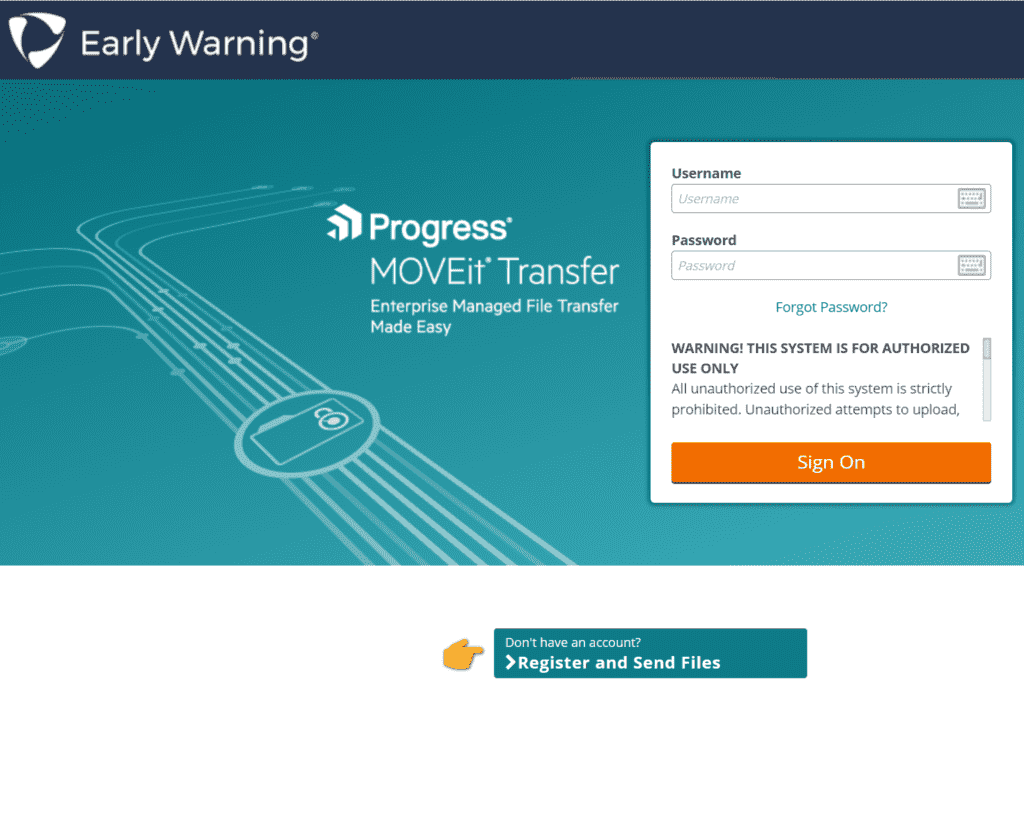
然后输入个人邮箱,Recipient Email 填写 [email protected]
此时,个人邮箱当中会收来一条设置初始账号密码的邮件。根据邮件当中的提示,点击进入官网,然后设置自己的初始密码。
设置完成初始密码之后,进入管理后台。可以在个人页面找到“Sent”。收件人会自动显示为“Consumer Services”,如果没有显示的话,也可以手动填入 [email protected]。
主题可以填写 Request EWS report 等等,附件中上传准备好的 PDF 文档和护照。
所有文件准备好之后,可以点击左上角的“发送”。
如果账户密码发生错误 Password Change Request Denied
当您在 https://consumerservices.earlywarning.com 尝试“忘记密码”并提交 Password Change Request 时被拒绝,通常说明系统在以下任一环节未通过验证或触发了安全防护:
1. 用户名 / 电子邮箱不匹配
“忘记密码”流程会验证您输入的用户名或注册邮箱是否与系统记录一致。
- 请确认输入的 用户名 或注册邮箱 与您此前在 EWS 消费者披露流程中填写的完全一致(包括大小写、全角半角、拼写)。
- 如果您的申请尚未激活在线访问账号,系统将无法找到匹配记录,导致拒绝。
2. 安全或风控策略拦截
为了防范恶意攻击和账户猜测,EWS 对频繁或异常的“忘记密码”请求会进行风险评估:
- 多次连续提交会触发 速率限制(Rate Limit),短时间内超过 3 次请求可能被临时锁定。
- 来自不同 IP 地址、不稳定网络环境或 VPN 下的请求可能被视为可疑。
3. 会话 /Token 已过期
“忘记密码”流程通常涉及电子邮件中包含的重置链接或一次性 Token:
- 如果您点击的链接已过15 分钟(或系统设定的时效)未完成重置,Token 会自动作废,提交时会被拒绝。
- 请务必在收到邮件后尽快操作,并确保同一浏览器环境下完成。
4. 账户状态异常
如果您的消费者访问账户正在 审计 或因之前争议、身份核查未通过而被 暂停 / 锁定,也无法进行密码重置:
- EWS 在调查身份或争议时,会暂时禁止任何凭证更新操作。
- 在您提交身份验证材料并完成审核前,密码更改请求会被系统拒绝。
建议解决步骤
-
确认注册信息
- 核对最初申请 EWS 消费者披露时使用的 用户名 / 邮箱;确保无误后再提交。
-
检查邮箱及链接
- 在收到“密码重置”邮件后 15 分钟内 点击并完成表单。
- 若链接已过期,请再次发起“忘记密码”请求。
-
避免多次快速提交
- 若系统提示拒绝,等待 30 分钟 后再尝试,或更换稳定网络环境(关闭 VPN/ 代理)。
-
联系消费者服务部
- 若仍然被拒绝,拨打 800-745-1560 或发送邮件至 [email protected]
- 提供您的用户名、注册邮箱、近期请求时间,以便客服核查账户状态与锁定原因。
-
完成身份验证
- 按客服指引提供身份证明(例如身份证复印件、住址证明),以解除账户暂停并恢复密码重置功能。
按照上述步骤操作后,您即可顺利通过“忘记密码”流程,重新设置并登录您的 Early Warning 消费者访问账户。